


Kubernetes has been on a decade-long journey to decouple its core from vendor-specific storage solutions by migrating from in-tree storage plugins to Container Storage Interface (CSI) drivers. On Microsoft Azure, the built-in kubernetes.io/azure-disk storage provisioner was deprecated in v1.19 and entirely removed in v1.261, 2. Failure to migrate meant any scheduling event, including a routine deployment, could prevent a stateful application from re-attaching its underlying storage, causing application failure.
Standard migration paths require downtime. At our scale, taking hundreds of disks (backing data stores like ClickHouse, CockroachDB, Kafka, Prometheus) offline was off limits. This blog introduces an in-place PVC re-binding technique that swaps a PersistentVolumeClaim’s backing PersistentVolume while keeping the underlying disk intact. It requires only a single pod restart per volume, done entirely using the Kubernetes API natively with no custom software or control plane hacks. We use Azure managed disks on Azure Kubernetes Service (AKS) to illustrate, but this method works universally on self-managed and cloud-provider managed Kubernetes distributions.
The CSI migration is old news for most teams. But the PVC re-binding technique itself unlocks operational capabilities often considered too risky by platform teams (e.g. modify performance tier for SSD). We used it to migrate several hundred production disks in under 2 months without a single incident or byte of data loss.
What Makes This Hard
To understand why this migration is difficult, we need to talk about how Kubernetes handles persistent storage and immutability.
Kubernetes persistent storage has three core components.
A PersistentVolume (PV) is a cluster-level resource that represents a real piece of storage, like an Azure Disk.
A PersistentVolumeClaim (PVC) is a request for storage made by an application, living in the same namespace as its pods.
A StorageClass defines the type of storage and, critically, the provisioner responsible for creating it (e.g.
disk.csi.azure.com).
These come together through dynamic volume provisioning. When a developer creates a PVC that specifies a StorageClass, the provisioner automatically creates a PV meeting the claim’s specifications. Kubernetes then binds the PVC to the PV. This binding is an exclusive one-to-one mapping enforced by the claimRef attribute on the PV.
The problem is that nearly every field that matters for this migration is immutable.
The
provisionerfield in a StorageClass is immutable. We can’t simply update it to point to the new CSI driver.We could create a new StorageClass. But once a PV is bound to a PVC, we can’t replace all references to the old one.
A PV’s
spec.persistentVolumeSource, which defines the actual storage backend, is also immutable. Patching it returns: “spec.persistentVolumeSource is immutable after creation”.A StatefulSet’s
spec.volumeClaimTemplatesis immutable too. Changing thestorageClassNamein this template is rejected with a “forbidden“ error.Same for a pod’s
spec.volumessection. It’s immutable and a patch will fail with a “forbidden“ error.
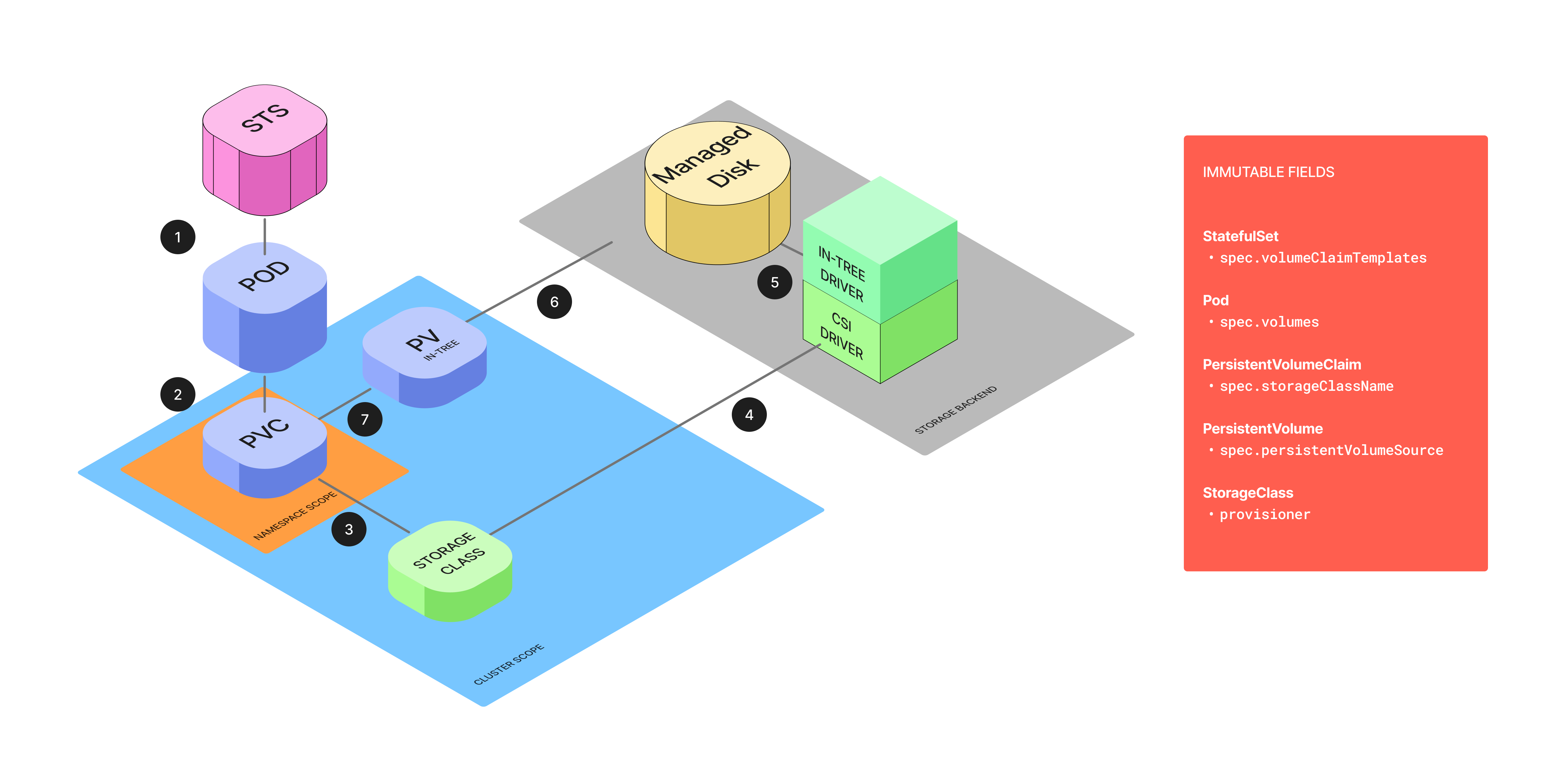
These constraints are deliberate. They enforce Kubernetes' persistence principle: storage is a durable, stable resource, while pods are ephemeral and replaceable. StorageClasses, PVs, PVCs, like several other Kubernetes objects are immutable. The only way to change these resources is to destroy and recreate them.
Understanding Kubernetes Nuances
Given the immutability constraints, a direct migration is impossible. But lesser-known behaviors in Kubernetes provide the building blocks for our live migration strategy.
StorageClass objects are passive. They are only used at the moment of provisioning, after a PV is bound to a PVC, the StorageClass plays no role. This means an existing PV and PVC is completely unaffected if their original StorageClass is deleted. We can exploit this behavior by deleting the deprecated in-tree StorageClass and immediately creating a new CSI-based one with the exact same name. This wouldn’t impact running applications.
A PV’s
claimRefcontrols binding behavior. When a PV is firmly bound to a PVC, itsspec.claimRefcontains thekind,name,namespace, and crucially, theuidandresourceVersionof the PVC. If the reference contains auid, the PV controller considers the binding firm. If it does not, the PV is considered an available candidate for binding to a PVC with a matchingnameandnamespace. This is the key insight. We can manually create a second PV that points to the same underlying Azure Disk but is defined as a CSI volume. By settingnameandnamespacein itsclaimRefbut omitting theuid, this new PV becomes a “honeypot” volume, waiting to be claimed by a PVC of the right name.The
pvc-protectionfinalizer prevents premature deletion. Kubernetes automatically adds thekubernetes.io/pvc-protectionfinalizer to any PVC actively used by a pod. With this finalizer present, deleting the PVC only sets adeletionTimestamp, putting it into a Terminating state. The PVC object isn’t actually removed until the pod using it is deleted, which deletes the finalizer. This built-in safety mechanism prevents race conditions. It ensures that when we delete the pod, the StatefulSet controller won’t immediately create a new empty volume before our “honeypot” PV can be claimed.
In-Place PVC Re-Binding Algorithm
Before starting the per-disk migration, we replace the legacy StorageClass with a new CSI-based one that has the exact same name. This tricks the control plane into using the new CSI driver when it automatically re-creates the PVC later.
Create a backup of the legacy StorageClass.
kubectl get sc managed-premium -o yaml > managed-premium-legacy.yamlThe legacy StorageClass will look like this:
# managed-premium-legacy.yaml

apiVersion: storage.k8s.io/v1
kind: StorageClass
metadata:
  name: managed-premium
provisioner: kubernetes.io/azure-disk # The legacy in-tree provisioner
parameters:
  storageaccounttype: Premium_LRS
  kind: Managed
reclaimPolicy: Delete
volumeBindingMode: WaitForFirstConsumer
Delete the legacy StorageClass.
kubectl delete sc managed-premiumCreate the new CSI StorageClass with the same name.
# managed-premium-csi.yaml

apiVersion: storage.k8s.io/v1
kind: StorageClass
metadata:
  name: managed-premium # The exact same name as the old one
provisioner: disk.csi.azure.com # The new CSI provisioner
parameters:
  skuName: Premium_LRS
reclaimPolicy: Delete
volumeBindingMode: WaitForFirstConsumer
Apply this new StorageClass:
kubectl apply -f managed-premium-csi.yaml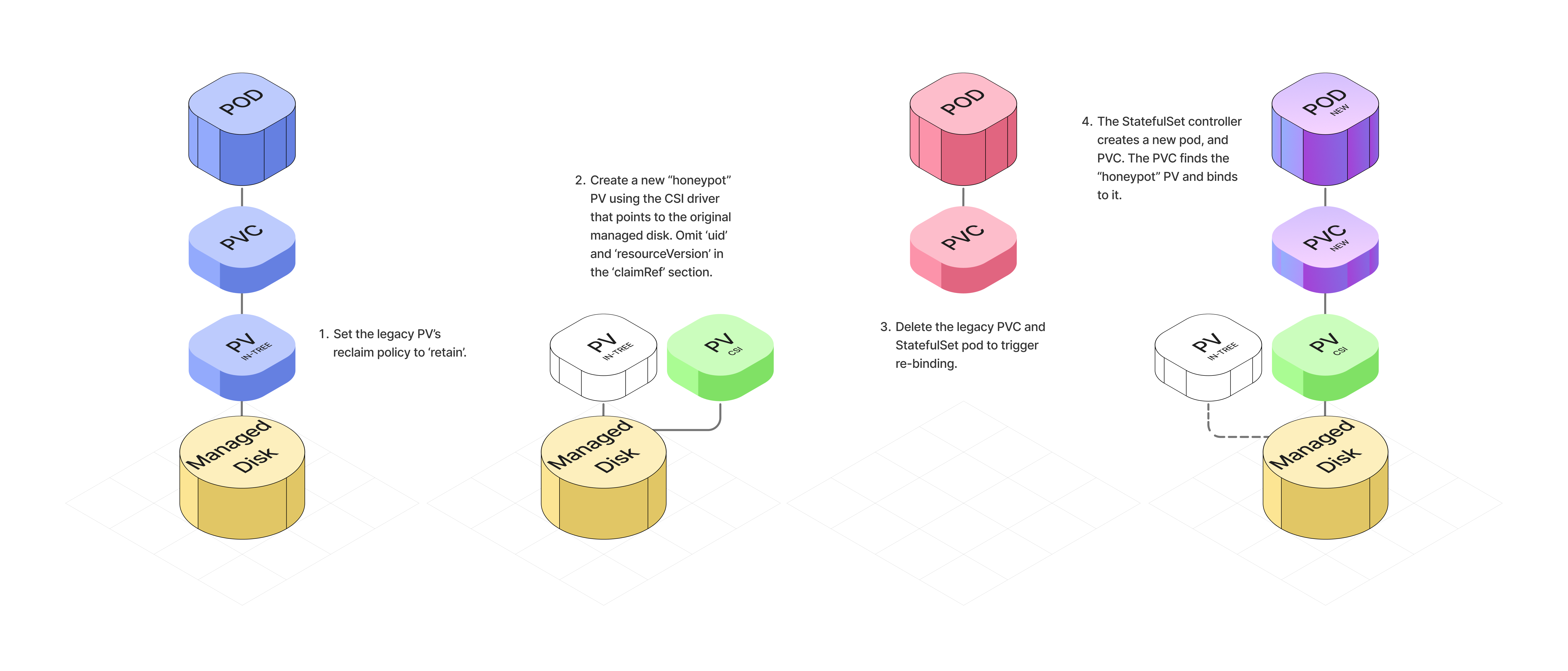
With the groundwork laid, we execute the following steps for each individual disk.
Identify the target resource. Start by identifying the specific StatefulSet pod to migrate, then get the name of its PVC, its bound PV, and the URI of the underlying Azure Disk. The disk URI is our critical identifier for the physical storage.
# Set variables for your environment

export POD_NAME=”<your-pod-name>”
export PVC_NAME=$(kubectl get pod $POD_NAME -o jsonpath=’{.spec.volumes[?(@.persistentVolumeClaim)].persistentVolumeClaim.claimName}’)
export PV_NAME=$(kubectl get pvc $PVC_NAME -o jsonpath=’{.spec.volumeName}’)

echo “Pod: $POD_NAME”
echo “PVC: $PVC_NAME”
echo “PV:  $PV_NAME”

# Get the Azure Disk URI from the legacy PV object and save it

export DISK_URI=$(kubectl get pv $PV_NAME -o jsonpath=’{.spec.azureDisk.diskURI}’)

echo “Disk URI: $DISK_URI”
Set the legacy PV’s reclaim policy to “Retain”. This is an essential safety measure that ensure the physical Azure Disk is not automatically deleted when we delete the Kubernetes PV object later.
kubectl patch pv $PV_NAME -p ‘{”spec”:{”persistentVolumeReclaimPolicy”:”Retain”}}’Create a new CSI PV. Create a new PV object that points to the same underlying Azure Disk. Set its
nameandnamespaceto match the legacy PVC in the PV’sclaimRefsection, but omit theuidandresourceVersionfields to allow re-binding. This is our “honeypot” PV.
# pv-csi-yaml

apiVersion: v1
kind: PersistentVolume
metadata:
  name: pv-migrated-csi # A new, unique name for the PV object
spec:
  capacity:
    storage: 100Gi # IMPORTANT: Use the actual size of your disk
  accessModes:
    - ReadWriteOnce # Match the original access modes
  persistentVolumeReclaimPolicy: Retain # Or Delete, if you prefer post-migration
  storageClassName: managed-premium # The name of the StorageClass we replaced
  claimRef:
    # IMPORTANT: These must match the original PVC exactly
    name: my-claim # Use your PVC_NAME variable here
    namespace: default # The namespace of your PVC
    # CRITICAL: Do NOT include ‘uid’ or ‘resourceVersion’. This is intentional.
  csi:
    driver: disk.csi.azure.com
    volumeHandle: <YOUR_AZURE_DISK_URI> # Paste the DISK_URI from Step 1
    volumeAttributes:
      fsType: ext4 # Or xfs, matching your original disk
Apply the new PV.
kubectl apply -f pv-csi.yaml4. Trigger the re-binding. Delete the legacy PVC and the corresponding StatefulSet pod.
kubectl delete pvc $PVC_NAME
kubectl delete pod $POD_NAME
The following happens automatically:
Deleting the PVC puts it into a “Terminating” state. The
pvc-protectionfinalizer keeps it alive as long as the pod is running.The pod goes through its shutdown sequence and is deleted.
When the pod is deleted, the finalizer is removed from the PVC, and the PVC is fully deleted.
The StatefulSet controller creates a new pod to replace the deleted one. The new pod creates a new PVC with the same name.
Kubernetes finds the honeypot CSI PV we created in Step 3 and binds it to the new PVC.
The new pod starts and the Azure Disk is mounted to it.
5. Verify the migration. Watch the pod start successfully and verify the application is running correctly.
kubectl get pods -wCheck the PVC status is “Bound”.
kubectl get pvc $PVC_NAME

# NAME        STATUS   VOLUME              CAPACITY   ACCESS MODES   STORAGECLASS      AGE
# my-claim    Bound    pv-migrated-csi     100Gi      RWO            managed-premium   15m
Confirm the PVC is bound to the new CSI PV.
kubectl get pv pv-migrated-csi

# NAME              CAPACITY   ACCESS MODES   RECLAIM POLICY   STATUS   CLAIM                  STORAGECLASS      REASON   AGE
# pv-migrated-csi   100Gi      RWO            Retain           Bound    default/my-claim       managed-premium            5m
Confirm the legacy PV’s status is ‘Released’, indicating it is no longer bound and can be safely cleaned up.
kubectl get pv $PV_NAME

# NAME        CAPACITY   ACCESS MODES   RECLAIM POLICY   STATUS     CLAIM     STORAGECLASS      REASON   AGE
# pv-legacy   100Gi      RWO            Retain           Released   ...       ...                          20m
Once the application is running correctly on the new pod with all data intact, safely delete the legacy PV object.
Alternative Approaches
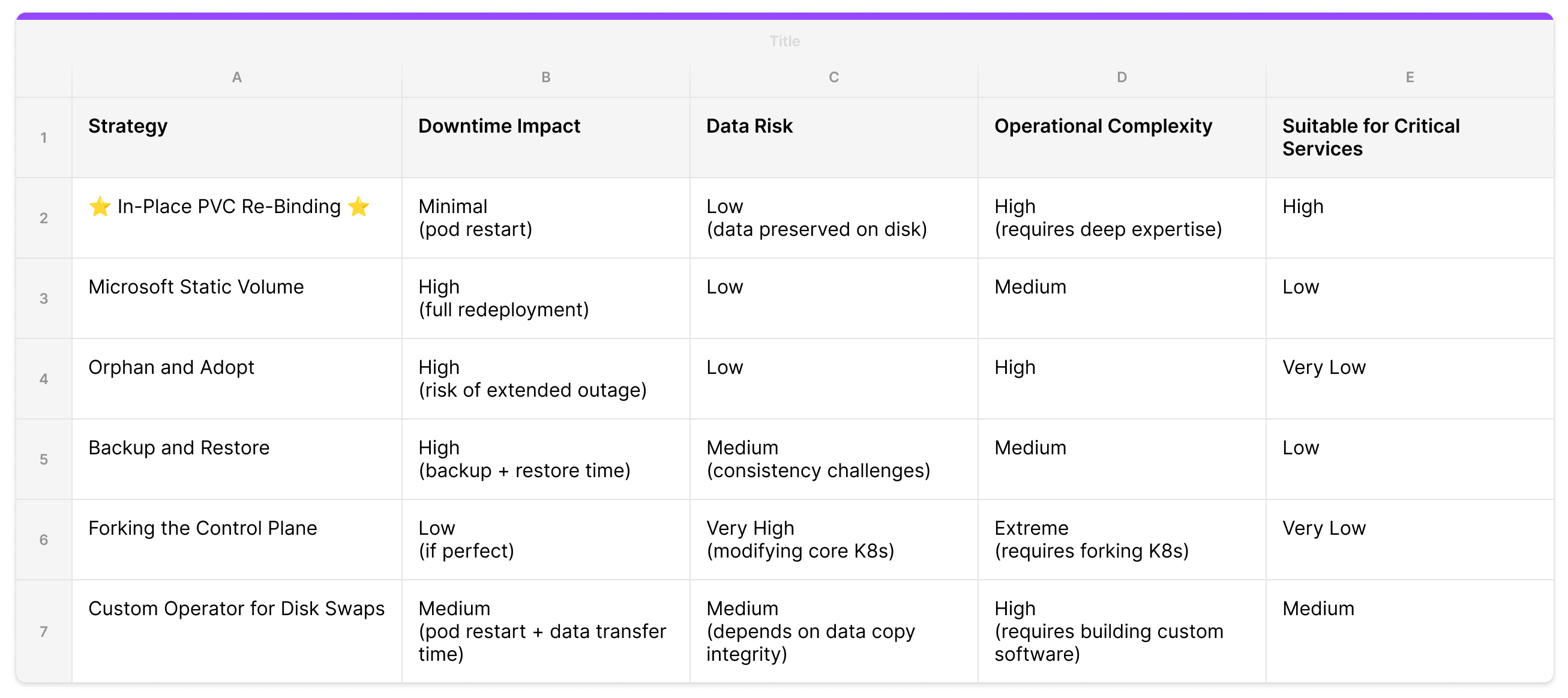
There are several other ways to solve this problem. Each comes with tradeoffs in service disruption, data loss risk, and operational complexity.
Microsoft Static Volume
Microsoft’s official documentation for migrating from in-tree to CSI drivers on AKS proposes a similar but more manual method. The process involves patching the original PV’s reclaimPolicy to “Retain”, manually creating new PV and PVC manifests that point to the same underlying Azure Disk, and then updating the application deployment to reference the newly created PVC.
This approach preserves data on the disk. However, it requires a full application redeployment to switch to the new PVC, which means downtime and an operational maintenance window for each migration.
Orphan and Adopt
Another approach is to orphan pods from their controlling StatefulSet. This involves deleting the StatefulSet with the --cascade=orphan flag, which leaves the pods and their PVCs running but unmanaged. A new StatefulSet using the updated CSI StorageClass can then be created to “adopt” the existing pods.
The risk here is significant. Without a controller, pods won’t get restarted or rescheduled in case of a node failure or eviction. For critical stateful workloads, this exposure window can lead to permanent data loss.
Backup and Restore
Platforms with mature Day-2 operations can perform a “cold” migration using tools like Velero. This takes a complete snapshot of the application and its data, which can then be restored with modifications applied to the StorageClass before restore.
Backup-restore is powerful for disaster recovery but requires pausing applications. For large disks this introduces significant downtime. In a microservices architecture where pausing one service can cause cascading failures, this is a non-starter.
Forking the Control Plane (The Datadog Approach)
At KubeCon EU 2024, Datadog presented an approach that involved forking the Kubernetes source code and patching the API server to bypass immutability constraints on live objects. This gives ultimate control over storage definitions of running pods.
This strategy isn’t suitable for managed Kubernetes services like AKS, GKE, or EKS, where access to modify control plane components is restricted. Forking the Kubernetes codebase also introduces long-term maintenance overhead and the risk of deviating from upstream. Unsustainable for most platform teams.
Custom Operator for Disk Swaps (The “ATOM”-ic Approach)
ATOMS implemented a custom operator to handle shrinking a cloud provider managed disk. It uses a custom resource, mutating webhook, and volume-populator to provision new disks and transfer data between old and new PVCs. It handles volume resizing declaratively without manual operation.
For our use case this was more machinery than needed. We did not need to make any changes to the underlying Azure Disk. No data copy required. That said, a custom operator is a natural automation layer on top of the re-binding technique for teams that need ongoing storage operations.
Conclusion
We used this technique to migrate several hundred PVs on a platform operating 100s of Kubernetes clusters across a multi-region topology. The bulk of the complexity came from coordinating across large-scale data stores (like ClickHouse, CockroachDB, ElasticSearch, Kafka, and Prometheus), all running on cloud managed disks for durability and resilience where downtime or data loss was off limits. The migration was completed in under 2 months with a lean platform team and zero incidents.
A few learnings from this project:
Deep systems knowledge trumps brute force. The solution came from understanding the less obvious mechanics of the Kubernetes control plane (how
claimRefbinding works, when finalizers fire, and StorageClass behavior at runtime). Working with the system’s guardrails produced a simpler, safer result than any brute force approach.Experimentation builds operational excellence. We uncovered critical edge cases (like premature PV deletion causing Multi-Attach errors during node drains) only by pushing the system to failure on staging. Confidence in production comes from understanding how a system breaks, not just how it works.
Automation is the key to reliability at scale. Automation lets us move fast and consistently, reducing the risk of human error. We automated the entire algorithm but gated the final pod restart with human approval so teams have control over when it’s safe to restart an application.
Shoutout to Rasmus Bach Krabbe and the storage team at ATOMS for walking us through the inner workings of their PvcAutoscaler. We took one look at all that machinery and decided there had to be a lazier way. Their operator is a serious piece of infrastructure at scale.